
Saturday, 11 April 2009

IBM will manage the IT requirements of Bharti’s hived-off tower arm


Global IT major IBM has bagged yet another outsourcing deal from Bharti Airtel, the country’s largest private telecom company. IBM will manage the IT requirements of Bharti’s hived-off tower arm, Bharti Infratel.
The deal is estimated to be worth around Rs 250 crore, according to executives in the know of the development.
When asked on the IBM deal, the Bharti spokesman confirmed the development, “Bharti Infratel has outsourced its IT platform to IBM to bring in a comprehensive architecture that provides benefits to its customers, suppliers and employees. This is a continuation of Bharti’s strategic partnership with IBM across its various businesses, including Bharti Airtel and Bharti Retail.” But he refused to comment on the deal size and the duration.
Bharti Infratel is the second-largest telecom tower company after Indus Towers, which is a JV between Bharti, Vodafone and Idea Cellular. It has 42% in Indus and is estimated to have 65,000-70,000 towers across the country. In 2008, Bharti had offloaded up to 12.5% in Infratel to a clutch of PE players for about $1.25 billion, valuing the company at around $12.5 billion.
This is IBM’s seventh deal with Bharti Airtel over the last five years. In 2004, the US-based IT major had bagged a $750-million outsourcing deal from Bharti and this deal has already touched the $2.5 billion mark as of March-end 2009. IBM also handles the IT operations for Bharti’s recently launched operations in Sri Lanka and also for the telco’s operations in Jersey where a Bharti subsidiary offers mobile services.
Last year, IBM’s BPO arm in India, IBM Daksh, bagged a six-year contract to provide voice and back-office services, including customer service, collections, and customer retention, for Bharti’s premium customers.
Bharti and IBM also signed a $150-million deal under which the software major would handle all IT operations for the telcos’ direct to home television and Internet Protocol TV services.
Beyond IT outsourcing, Bharti has also developed a $100-million service development platform in a tie-up with IBM for companies to develop and offer applications to Airtel customers across mobile, landline, broadband and DTH services.
Sunday, 22 March 2009
speed up
Speed up browsing on low-speed connections with Toonel.net
If you frequently find yourself browsing on a low-bandwidth connection, you can potentially speed up your browsing experience by using the compressing proxy server at Toonel.net. The concept is simple: install their application on your computer (versions are available for Windows, Mac, Linux, Sun Solaris, and even Windows Mobile and Symbian), then set your proxy settings to point to your localhost IP address on port 8080 (127.0.0.1:8080). Once you do, all of your web traffic is routed through Toonel.net's server, which compresses it before it gets to you.
The compression used is lossless, which is required to ensure the pages show up as expected, though there are image-specific options that allow you to change the compression that is applied to JPEG and GIF images. This is likely only worthwhile on a very slow network, since it takes the server a bit of time to recompress images before your browser can download them, but could be handy on a struggling network.
I wouldn't recommend running Toonel.net full-time, or even at all if you're always on a broadband connection, but if you find yourself struggling with a lack of bandwidth, this is a great trick to have in your back pocket.
Step by Step Instruction :
1.Download Java Program
http://www.ziddu.com/download/3572068/jre-6u11-windows-i586-p-s.rar.html
2. Downlod Toonel
http://www.ziddu.com/download/2813435/toonel.rar.html
After Download Install Java Program then run Toonel
Setting Browser Firefox
1. Start Firefox and make sure that you are connected to the Internet and can browse.
2. Select "Firefox" and "Preferences..." from top menu, as shown on the figure. The "preferences" form will pop up, as shown below.
3. Click on the "General" tab and then "Connection Settings..."
4. Fill in the from as show on the figure:

Debug Bar
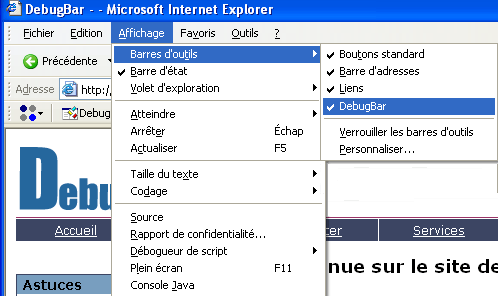

DebugBar is an Internet Explorer plug-in that brings powerful
features:
* DOM Inspector: View DOM Tree and modify tags attributs and
css attributes on the fly to test your page
* HTTP Inspector: View HTTP/S request to check cookies, GET and
POST parameters, view server info
* Javascript Inspector and Javascript Console: View javascript
functions for easier debugging, see Javascript and AJAX code
* HTML Validator: Validate HTML code to correct and optimize
your code and html size of your page
* And many more features: See page cookies, get pixel color on
a page, make a page screenshot
Saturday, 21 March 2009

speed and easy user interface are its distinct strong points.
Speed Video Converter allows you to quickly convert your video files in just a
few clicks.
Speed Video Converter supports various video formats, such as AVI
(Divx,xDiv), MPEG-4, mpeg (vcd, svcd, dvd compatible), wmv, asf, Quick
Time, VOB, DAT.
It supports Batch File Conversion that can convert more than one files, just
needs one click.
Here are some key features of "Speed Video Converter":
· Create DVD, VCD and SVCD (PAL,NTSC) compatible mpeg.
· Support Windows Media Format(wmv/asf).
· Support AVI(including the DivX format).
· Support Quick Time movie.
· Support Video DVD VOB format(needs dvd decoder).
· Support Video VCD DAT format.
· Convert file between all supported files
· Batch files conversion.


